Saturday, March 22, 2014

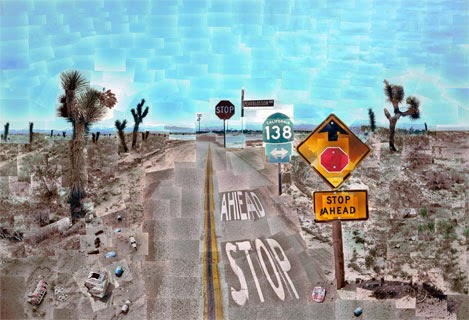
Step-by-step David Hockney

The best way to shoot a David Hockneyish image(s) is to
use a medium focal length lens 50-100 mm, stand in one place,

use Program mode or set the camera to manual so the exposure does not change and photograph the scene.
You might start at the bottom left - sweep right then move up and sweep left - and continue until the entire object is captured. Be sure to overlap your images.
Shoot about 24-36 images.
Download your images onto your computer or jump drive or….take your card to Wal Mart and have 4x6 prints made.

Once pictures are uploaded:

1-Create a new document in Photoshop (file>new) Make it 10000x10000 pixels. This will give you a very large blank canvas to add your photos to.

2-Next, open your photos in Photoshop. (You may want to only open the ones you think you may actually be using)

3-Use the Move Tool to drag each photo on to the blank canvas. Begin piecing them together as you add them in (keep them as their own layers so you can make adjustments to each image if needed).

4-Once photos are laid-out use the Crop Tool to crop the excess white canvas around artwork (do not crop any of the pictures!)

5-Edit each layer (using Image Adjustments) so that all the photos have good contrast and are all matching in colors. This may take a long time as you will need to do this to all your layers.

6-When you are done print your image!

Photo Montage Assignment due Friday, March 28 at 9 am

Assignment #6: 

Create 4 (four) 8x12 images using a photo montage technique.

You can do 4 of David Hockney, 4 Multiple Me, 4 Levitation, or 4 Maggie Taylor inspired photographs.  If you wish you can do a combination of all four.  Your choice.

Due: Friday, March 28, 2014 at 9 a.m. uploaded on your blog.  You do not have to print the images at this time.  You may want to print one or all of the images at a later date for your final 20 on the final exam.

What: Bring the files of all images on your hard drive to class. We will be using these files for the lab exercise in Photoshop, to print if you wish and for your Blog.

If you have the images posted on the blog by 9am you will receive a 100. If you do not have the images posted on the blog by 9am you will receive a 0.

Remember there are no late assignments accepted or extra credit assignments provided in this class.

We will take a look at your blogs on Friday, talk about what was easy or hard, have the next lecture and then have lab time to work on your images in Photoshop if you need/want help.

Tuesday, March 18, 2014

What to bring to class on Friday

David Hockney, Pear Blossom
Hope you had a great Spring Break!  Did you take any great pictures?  Are they on your blog?  Let me know and I'll go look.

We are now on the home stretch to finals.

Friday we will begin work on the David Hockney, Multiple Me, Levitation and Maggie Taylor assignment.


Please bring your:

  • camera, 
  • a tripod, 
  • card reader/cord to transfer pictures from your camera to the computer, 
  • large files of your alphabet images (not the ones you made smaller for the blog).
See you on Friday!


Levitation Example
Maggie Taylor

Multiple Me Example

Saturday, March 8, 2014

I found this to be inspiring....

What made Lauren Simonutti spend three and a half years, withdrawn from society, working alone in an initially dilapidated house that she converted—every corner, every nook, every stairway, used to stage frightening and preposterous and wonderful events—into a series of photographic tableaux?

http://art.newcity.com/2010/01/11/review-lauren-simonutticatherine-edelman-gallery/


Friday, March 7, 2014

Have a great Spring Break


Great job today on the mid-term critique. You worked hard and it showed. You don't have any home work over the break. Relax, enjoy and come back well rested.


You might want to consider entering your work into the student art show this Spring. It will need to be framed and perhaps matted. Just think about it.....

Saturday, March 1, 2014

Mid Term Critique is Friday, March 7 at 9am

Due:10 (ten) printed images size 8x12 with 1 inch white margins. Please put your full name on the back with a pencil. Also write what compositional tool you used for each of the 10 photographs on the back of each submission.

What: Shoot 10 different images using 10 different compositional tools. Below is the list of compositional tools you can choose from in order to create 10 final 8x12 images for the mid-term assignment:

1. Rule of Thirds
2. Filling the Frame
3. Framing
4. Dirty Framing
5. Silhoutte
6. Tunnel
7. Texture
8. Pattern
9. Leading Lines
10. Reflection
11. Shadows
12. Depth of Field (DOF)
13. Curved Lines (S Curve)
14. Meandering Lines
15. Diagonal Lines
16. Balance (Symetrical and Asymetrical)
17. Geometric Shapes
18. Fibonacci Ratio
19. Dynamic Symetry
20. Negative/Positive Space
21. Perspective
22. Sense of Scale
23. Rule of Odds
24. Stop Motion
25. Show Motion
26. Pan Motion
27. Cruciform
28. Sun Flare/ Star Burst

Things to consider: There are lots of students from all the other photography and VisCom classes printing their assignments for mid-term. Be sure to give yourself plenty of time to shoot and print. You can not be late for critique. Critique for your mid-term grade begins at 9 am sharp.

Don't Forget to email me your letters of the alphabet

Please don't forget to email me letters of your alphabet so that we can spell TAMU-C Art Department.

Email your letters to gsisco@yahoo.com.

About 2x2 jpegs or tiffs